Imagine receiving 10,000 calls in a single day. That’s a flood of requests arriving simultaneously, making it impossible for a manual team to handle everything efficiently. The risk of delays and errors increases, directly impacting customer satisfaction.
Using Foundry’s fine-tune is a great solution when you have large volumes of daily calls. With fine-tuning, we can train the model to understand the context and specific vocabulary of your business, making call routing more assertive.
Furthermore, since each sector has its own particularities, the customized model learns to recognize words and patterns that indicate whether a call is for “Billing,” “Support,” or “Sales.” This reduces human error and speeds up customer service, improving the entire experience.
Access Foundry fine-tuning
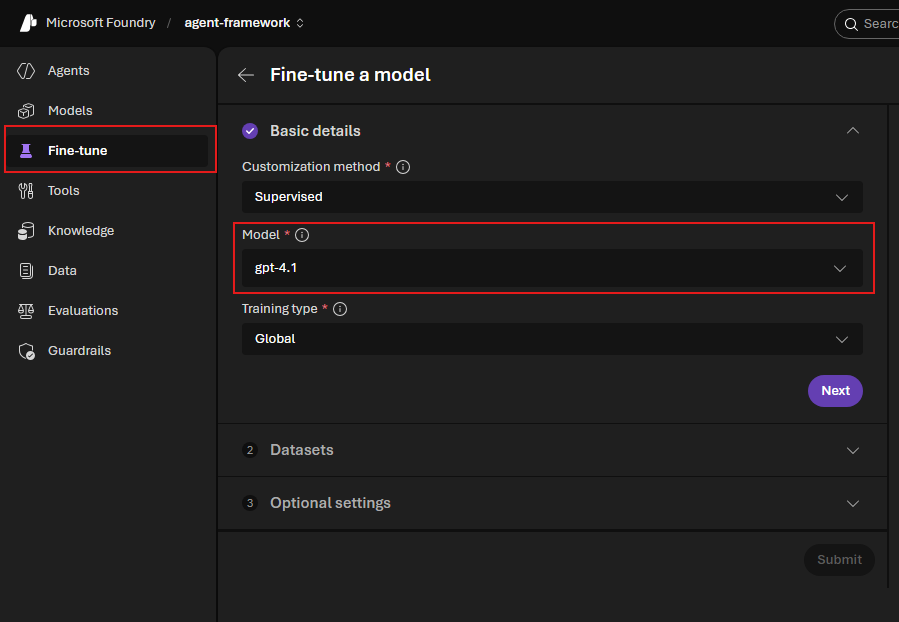
In the image above, under Model, you need to select a model that is capable of training other models; in this case, I’m using gpt-4.1. Once selected, click Next.
How do I feed the model with data?
One option is to create a *.JSONL (JSON Lines) file. This format is specifically for model training.
For our example, I have a JSONL file with several use cases as below:
{“messages”:[{“role”:”system”,”content”:”You are a ticket routing assistant. Classify incoming support tickets into exactly one category: Billing, Technical Support, or Sales. Respond only with the category name, without explanation.”},{“role”:”user”,”content”:”I do not recognize a charge of R$ 250 on my bill.”},{“role”:”assistant”,”content”:”Billing”}]}
{“messages”:[{“role”:”system”,”content”:”You are a ticket routing assistant. Classify incoming support tickets into exactly one category: Billing, Technical Support, or Sales. Respond only with the category name, without explanation.”},{“role”:”user”,”content”:”The app won’t open on my phone.”} Android.”},{“role”:”assistant”,”content”:”Technical Support”}]}
{“messages”:[{“role”:”system”,”content”:”You are a ticket routing assistant. Classify incoming support tickets into exactly one category: Billing, Technical Support, or Sales. Respond only with the category name, without explanation.”},{“role”:”user”,”content”:”I would like to increase my credit card limit.”},{“role”:”assistant”,”content”:”Sales”}]}
Add the JSONL file as your Training data source.
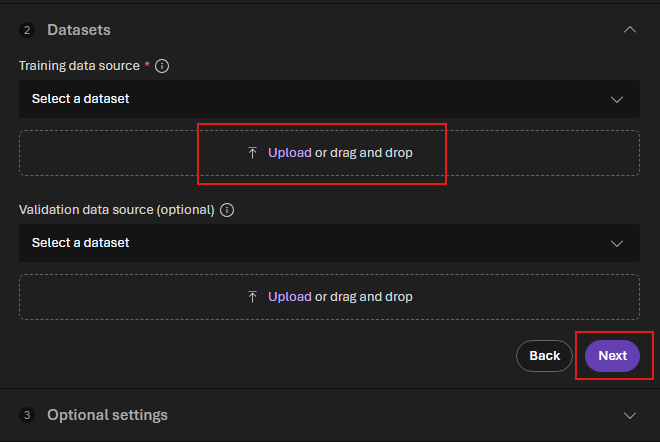
Once trained, the model can be integrated into the ticketing system to automatically classify each request as soon as it arrives. This frees up employees for more strategic tasks and helps maintain operational agility, even when dealing with thousands of tickets per day.
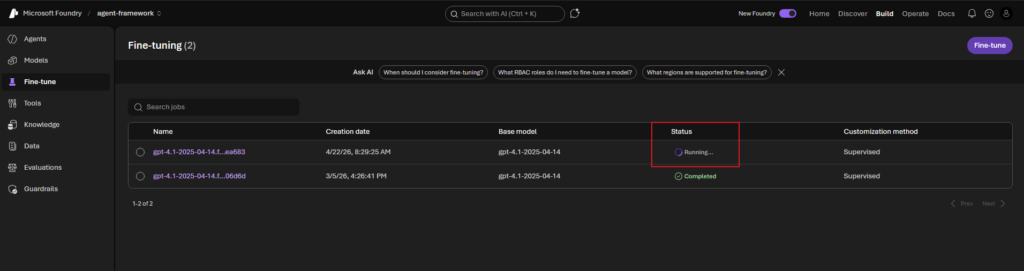
Depending on the number of use cases within the JSONL file, the training can easily last more than an hour.
Results
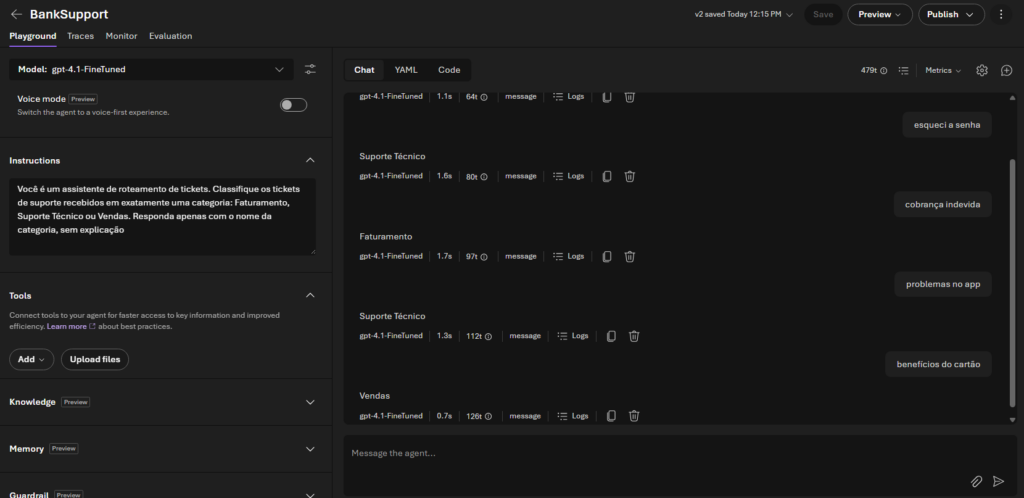
In the screenshot below, I demonstrate the results of some cases:
“Forgot password” -> Technical Support
“Incorrect charge” -> Billing
“App problems” -> Technical Support
“Card benefits” -> Sales
Conclusion
It’s possible to create a specific model for your business and train it; this scenario is an example of how fine-tuning can help streamline your process flow.
Information on the costs of maintaining this model and training fees -> https://learn.microsoft.com/en-us/azure/foundry/openai/how-to/fine-tuning-cost-management